Assigning Multiple Owners to a Task

Assigning Multiple Owners to a Task

Overview

Some tasks require collaboration across multiple team members. Assigning multiple owners ensures that everyone responsible is clearly identified and notified. This promotes shared accountability and faster progress.

When to Use Multiple Owners

Use multiple ownership when:

  • A task requires input or action from more than one person.

  • Team collaboration is necessary to complete the task.

How to Assign Multiple Owners

Option 1: From the Task Detail View

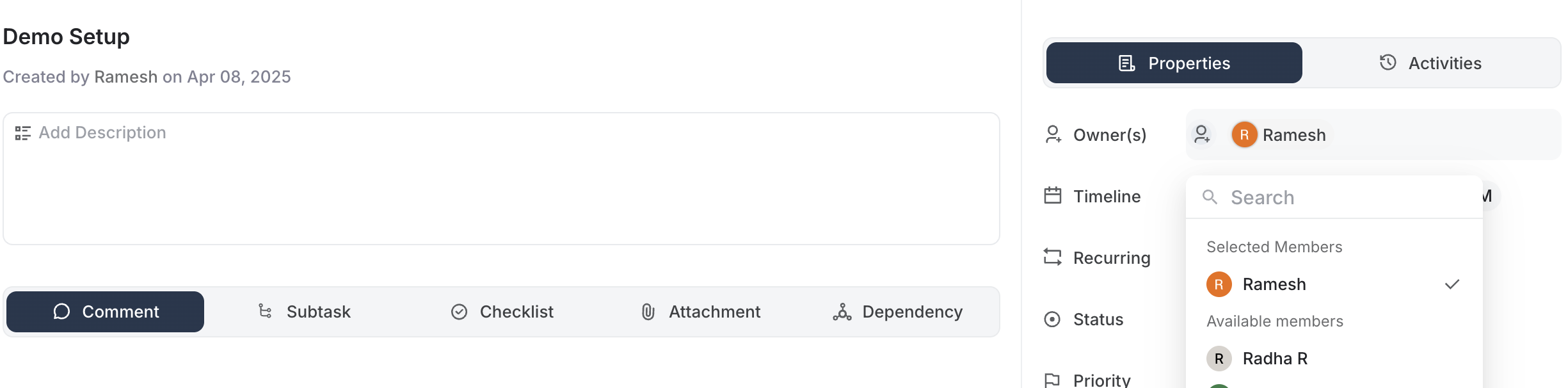
  1. Open the task you want to edit.

  2. Click the Owners field

  3. Select multiple members from the list.

  4. Save the task.

                                          
Multiple owners in Task Details view

Option 2: From the List View

  1. Go to the Tasks List View.

  2. Hover over the Owner column of the task.

  3. Click to edit and select multiple owners.

  4. The update is saved instantly.

                                          
Assigning Multiple Owners to a Task - List View

Option 3: From the Kanban Board

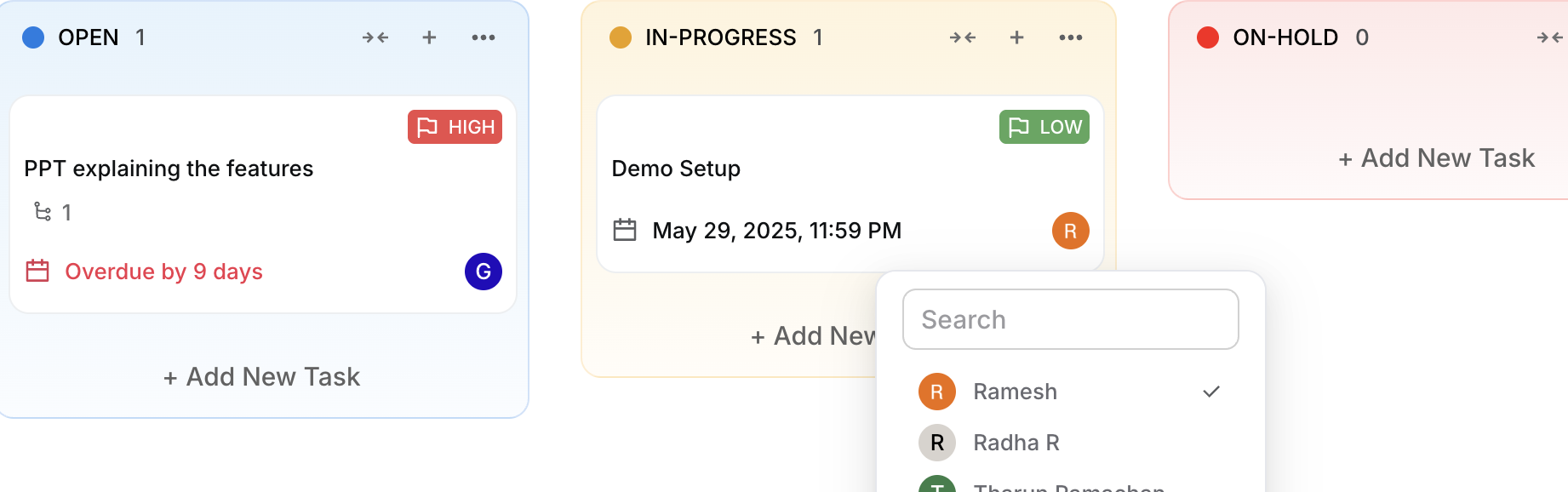
  1. Navigate to the Kanban Board.

  2. Click the task card to open quick actions or full details.

  3. Add or modify owners from the task preview.

  4. Changes are saved immediately.

                                          
Assigning Multiple Owners to a Task - Board View


Important Notes

  • All assigned owners will receive task notifications and updates.

  • Any owner can update the task status or add comments.

  • A task is marked complete when any one owner completes it.

  • You can reassign or remove owners at any time before the task is completed.

Example Use Cases

  • A design task that requires both a designer and a reviewer.

  • A launch checklist handled jointly by product and marketing.


    • Related Articles

    • Setting Task Reminders

      Overview Task reminders help you stay on top of your work by notifying you before a task is due. Reminders are configured based on the Due Date and Time of the task. You can set reminders for yourself or the task owners. When to Use Task Reminders ...
    • Managing Task Statuses at the Space Level in Astravue

      Each space in Astravue can have its own set of task statuses. This allows you to customize workflows that reflect how your team actually works — whether it's marketing, onboarding, support, or development. You can manage task statuses directly at the ...
    • Custom Fields in Astravue

      Sam leads a content production team handling multiple campaigns at once. For each task, he needs to capture the content type (blog, video, social post), approval status, and distribution channel. Before using Astravue’s custom fields, this ...
    • Managing Task Statuses at the Project Level in Astravue

      In Astravue, task statuses help you visualize and track the progress of tasks within a project. You can manage statuses using both Board View and List View. Here’s how you can do it: What is a Status? A status represents the current stage of a task ...
    • How to manage task status templates in Astravue

      Astravue gives you the flexibility to define custom task statuses based on how your team works. Whether you're managing support tickets, onboarding customers, or running agile, you can use or customize task status templates to match your workflow. ...